How to read Taboola and MGID reports, and what to optimize every week
Native campaigns are not set and forgotten. They are read and adjusted on a rhythm, and the rhythm matters more than any single clever move. This article explains which reports in Taboola Ads and MGID carry the signal, how to judge a publisher fairly, when to block, bid down or whitelist, how to spot creative fatigue before it costs you and what a disciplined week of optimization looks like.
The reports that carry the signal
Both dashboards offer dozens of views. Five of them do most of the work. The campaign summary tells you whether spend, cost per click and cost per acquisition are on plan. The site report in Taboola, and the widget report in MGID, break performance down by publisher placement, which is where native is won or lost. The item report in Taboola and the teaser report in MGID show each headline and thumbnail pairing. The platform or device report separates mobile, desktop and tablet. The day and hour view shows when conversions happen, which drives dayparting.
Read them in that order, and always alongside your own analytics. The platforms count conversions through the Taboola Pixel and the MGID sensor, and those counts should match GA4 and your CRM closely. When they diverge, fix tracking before you optimize, because every decision below depends on trusting the conversion column.
Judging a publisher fairly
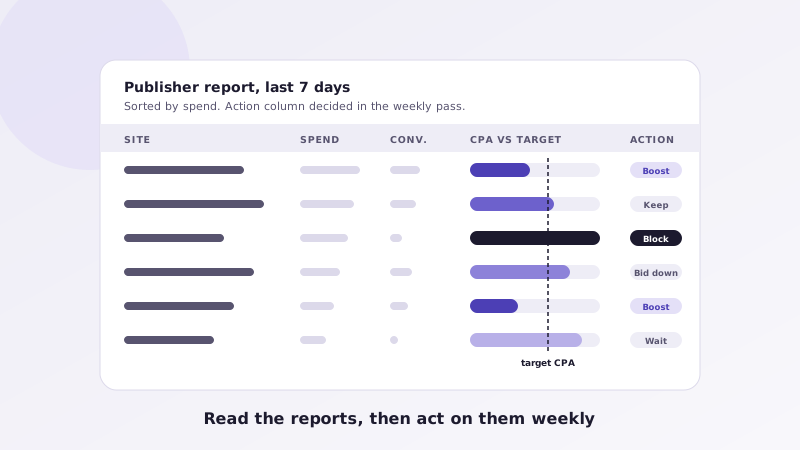
The publisher report tempts people into two mistakes: blocking too early and blocking too late. A site with a handful of clicks and no conversions has told you almost nothing. A site that has spent several times your target cost per acquisition with no conversions has told you plenty. We set a spend threshold, usually a multiple of the target CPA, before judging a placement, and we judge against a target rather than against the campaign average, because the average is dragged around by the biggest spenders.
Sort by spend, not by CPA, so you look at the placements that matter. For each site above the threshold, ask three questions. Is CPA under target? Keep or boost. Is CPA over target but converting? Bid down and watch. Has it spent well past the threshold with nothing? Block. Sites below the threshold go in a wait column and are reviewed next week. Section-level data, where the network provides it, lets you block a poorly fitting section of a good publisher instead of the whole site.
Block lists, whitelists and when to split
Block lists accumulate. Keep them at the account level where possible so new campaigns inherit them, and review them quarterly, because a publisher that failed one angle may suit another. Whitelists are the other side of the same work. Once a group of publishers has proven itself with consistent conversions over several weeks, move them into a dedicated whitelist campaign with its own budget and bids, separate from the discovery campaign that keeps testing new inventory. The whitelist campaign is where scale comes from; the discovery campaign is where the next whitelist comes from.
Bids by site and widget, and when to trust Smart Bid
Manual CPC gives you direct control during the learning phase. Taboola lets you adjust bids at the site level, and MGID lets you set coefficients per widget, so a placement that converts cheaply can get a higher bid and more volume while a marginal one is bid down rather than blocked. We change bids in modest steps, no more than a fraction at a time, and we give each change several days before reading it, because daily conversion counts are noisy.
Smart Bid, in its maximize conversions or target CPA modes, works well when a campaign has steady conversion volume and clean tracking. It works badly on thin data or on campaigns whose conversion rule fires on something cheap and frequent. When we switch a campaign to Smart Bid we keep a manual CPC campaign running as a control, so we can see whether the algorithm is actually beating the hand-managed version rather than just spending more.
Creative fatigue and rotation
The item and teaser reports show fatigue before the campaign summary does. A headline and thumbnail pairing that earned a healthy click-through rate in its first week will drift downward as the same readers on the same publishers see it repeatedly. Cost per click rises, volume falls and cost per acquisition follows. Frequency caps slow this, but they do not stop it.
Track click-through rate by creative age, not just in aggregate, and set a rule: when a proven item's click-through rate has fallen by a meaningful share from its peak, retire it and launch a refreshed variant of the same angle with a new thumbnail. Keep a library of what worked, including which publishers it worked on, so refreshes are informed rather than random. A new batch every two to three weeks is the usual cadence for an active account.
The weekly routine
Daily, check spend pacing, conversion tracking and policy status on both networks; this takes minutes and catches the problems that compound. Once a week, run the full pass in a fixed order. Reconcile conversions between the platforms, GA4 and the CRM. Review the publisher report against thresholds and act: block, bid down, bid up, whitelist, wait. Review the device and daypart reports and adjust splits or schedules where the data is clear. Review creative by age and click-through rate and schedule the next batch. Move budget between Taboola and MGID based on marginal cost per acquisition, not habit. Write down every change and the reason.
Monthly, step back: compare whitelist and discovery campaigns, revisit the block list, check landing page metrics by publisher and device, and decide the tests for the next month. The written log is what makes the monthly view possible. Without it, every optimization pass starts from memory, and memory in native advertising is short.
Key takeaways
- Five reports carry the signal: campaign summary, site or widget, item or teaser, device and day-hour, always reconciled with your analytics.
- Judge publishers only after a spend threshold, against a target CPA, sorted by spend: boost, keep, bid down, block or wait.
- Keep block lists at the account level and graduate proven sites into whitelist campaigns with their own budgets.
- Adjust bids by site and widget in small steps; use Smart Bid only with steady conversions and keep a manual control.
- Watch click-through rate by creative age, refresh every two to three weeks and log every change.
Want this routine run for you every week? The weekly optimization pass, with written notes and a standing meeting, is the core of our management service on Taboola and MGID. Request a proposal and we will show you what the first month of reports would look like.